
Earlier this month, Oppo commenced the rollout of ColorOS 16.1, its latest custom skin. The update is currently available for the Oppo Find X9 series, with availability for the Reno 15 series and Find X8 series anticipated to follow in the near future. The update introduces a host of noteworthy features, including Live Space (Oppo’s take on Dynamic Island), a Contour Glow effect, a redesigned camera app, an array of AI features, audio sharing, smoother animations, and more.
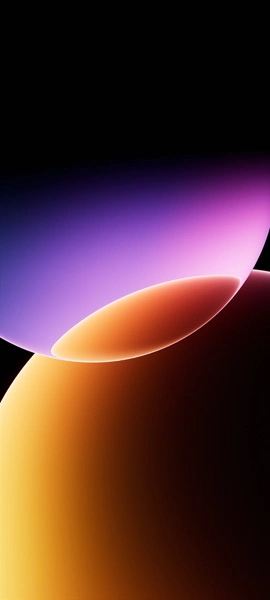
Apart from the new features, ColorOS 16.1 brings a new built-in wallpaper, which is now available to us in both static and live formats. Here you can download ColorOS 16.1 wallpaper for your device.
ColorOS 16.1 Wallpapers
Oppo’s Android 16-based ColorOS 16 skin is bundled with a bunch of cool stock wallpapers. For the incremental ColorOS 16.1 update, the company has introduced a fresh new wallpaper featuring a dark textured design. In contrast, the default wallpapers included with ColorOS 16 showcase more vibrant and colorful shades, offering a different visual appeal. The wallpaper is available in 2160 X 4800 pixels resolution, so there’s no need to be worried about the quality.
Note: These listed images are the preview of the wallpapers and just for the representation. Preview is not in the original quality so don’t download from images. Use the download link given in the download section below.
ColorOS 16.1 Wallpaper – Preview
Download ColorOS 16.1 Wallpaper
If you like the above-listed ColorOS 16.1 wallpaper and want to use it on your device, you can download the high quality using below links. You can use the below listed Google Drive link, our Telegram channel, or our Android app to download these wallpapers in high quality.
- Download ColorOS 16.1 Live Wallpapers (Android)
- Download ColorOS 16.1 Wallpapers (Google Drive)
- Download ColorOS 16.1 Wallpapers (Telegram)
After downloading the wallpaper, you can head over to the downloads folder and choose the wallpaper you want to set on your smartphone’s home screen or lock screen. Open it and then tap on the three-dot menu icon to set the wallpaper.
Explore More:
- Download Samsung Galaxy F70e Stock Wallpapers [FHD+]
- Download Poco X8 Pro (Max) Wallpapers [Original Quality]
- Download Motorola Razr Fold Wallpapers
- Download Honor 600 (Pro) Stock Wallpapers
- Google’s Aluminium OS wallpapers leak, download now
- Download Huawei Pura 90 Series Stock Wallpapers
- Download Huawei Pura X Max Stock Wallpapers
- Download OnePlus Ace 6 Ultra Stock Wallpapers
- 15 Mind-Boggling Wallpapers for iPhone and Android – YMWC 50

