

Motorola has been painstakingly working on the Android 16 rollout. The company has already released the update for a bunch of Edge and G-series phones. Now they are extending the testing of Android 16 to more phones. In this batch, the beta program goes live for Motorola Razr 2023, Razr+ 2023, Razr 40, Razr 40 Ultra, Edge 50 Neo, Edge 60 Neo, Moto G85, and ThinkPhone 25.
Motorola has officially confirmed the beta program announcement, and as per the details, you need to enter your details in the participation forum. If your application got approved, you will receive the Android 16 beta update on your Motorola smartphone through a special OTA update. The beta program is live in the following regions:
- Motorola Razr 2023 – US
- Motorola Razr+ 2023 – US
- Motorola Razr 40 – India, Brazil, LATAM
- Motorola Razr 40 Ultra – India, Brazil, LATAM
- Moto Edge 50 Neo – EMEA, India, Brazil, LATAM
- Moto Edge 60 Neo – EMEA, Brazil, LATAM
- Moto G85 – Brazil
- ThinkPhone 25 – EMEA
If you reside in any of the above-listed regions, you can join the Android 16 beta testing program. The update is expected to carry a flurry of new features, enhancements, and an updated security patch.
Talking about the features and changes, Motorola is pushing the Android 16 update to compatible phones with features like Live updates, Desktop Window, Group notifications, New Emojis, Embedded Photo Picker, APV codec support, Predictive Back upgrades, HDR screenshots, Advanced Protection Mode, and more.
How to Join Motorola’s MFN Beta
- At first, you need to register on the Motorola community website.
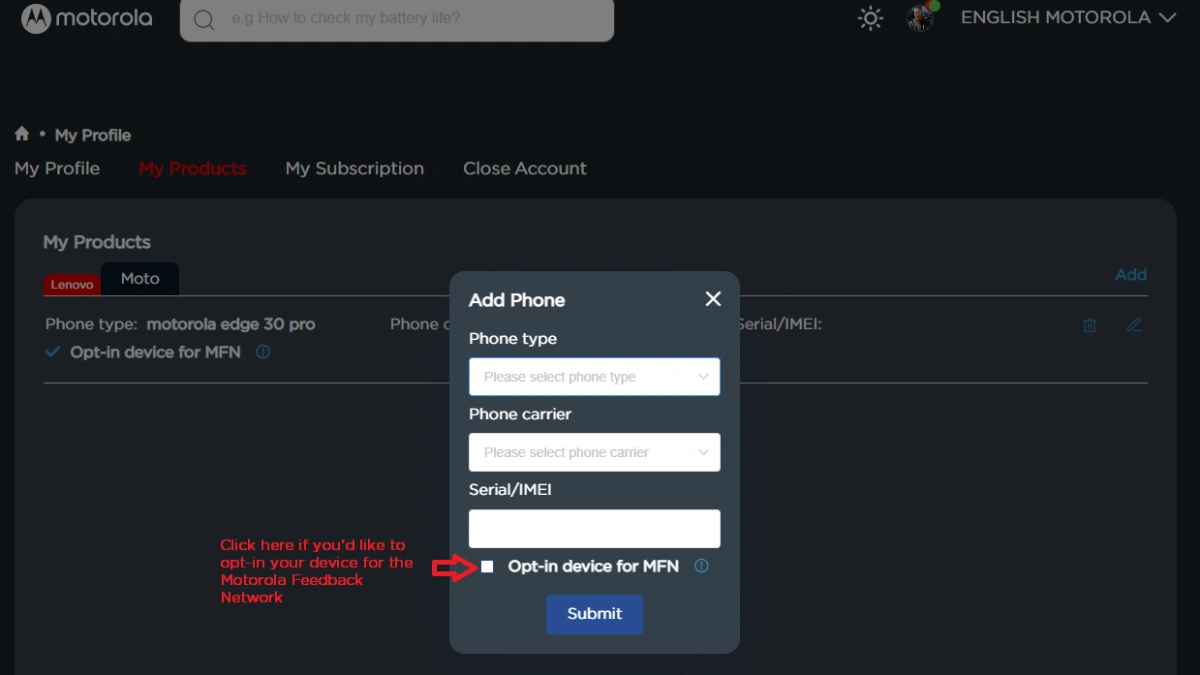
- Make sure your profile page is updated with your current IMEI or SN of your device.
- Opt-in your device for the MFN on your Motorola community profile.

- Keep your phone updated to the latest version.
- Now, visit the registration link that you will find on the current testing opportunity page. Make sure to visit the page for your device and region.
- Fill required details and submit the form.
Motorola will provide more details to participants via email, so be sure to check your inbox, including the spam folder. Additionally, you can regularly check for new software updates in settings.
Explore More:
- Android 16 update for Motorola Edge 2025 rolling out now!
- Exclusive – Motorola Signature Phone May Arrive With Stylus Support
- Motorola Signature (Edge 70 Ultra) Wallpapers are available for download before launch!
- Motorola releases Android 16 Beta for Moto Pad 60 Pro
- Android 16 update now rolling out to Motorola Edge 60 Stylus
- Breaking: Motorola kicks off Android 16 update for Razr 50 Ultra
- Android 16 update now rolling out to Moto G67 Power

